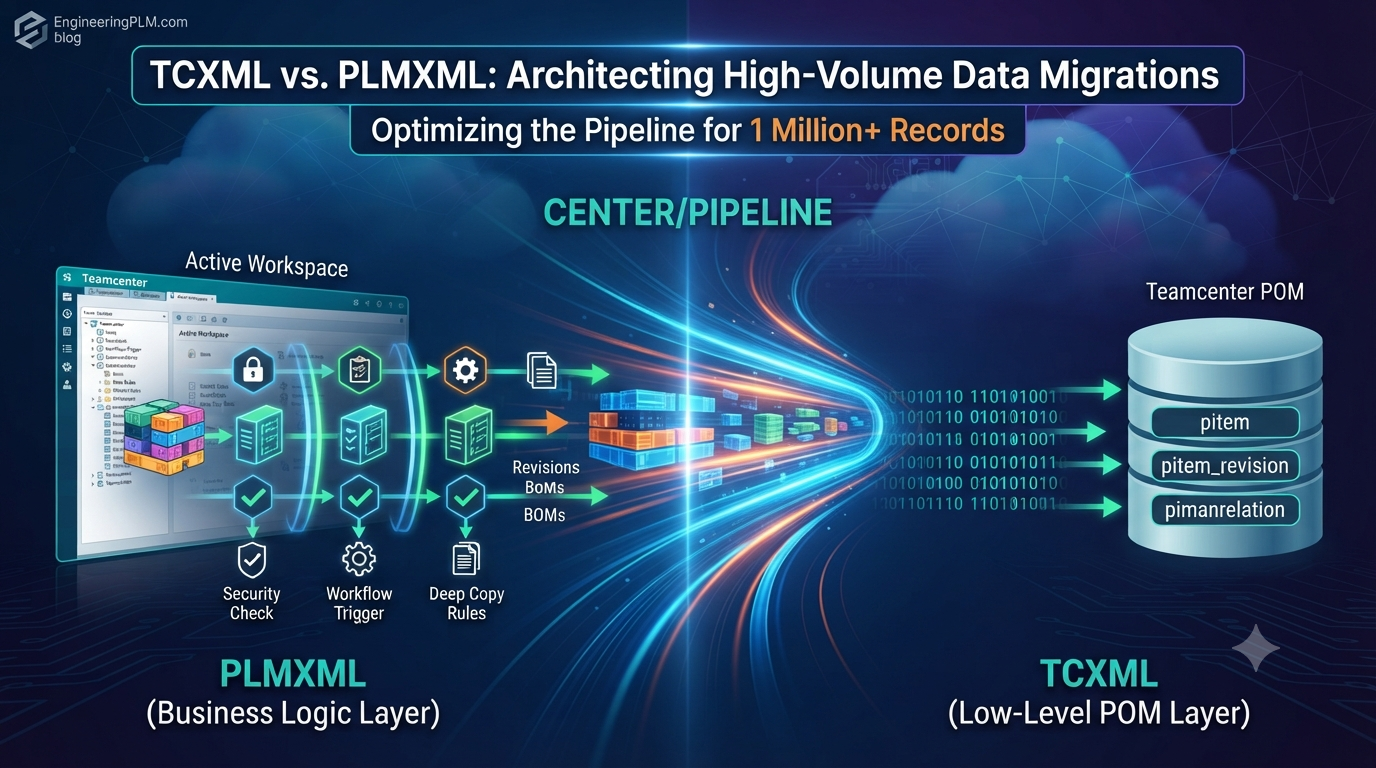
Welcome back to EngineeringPLM.com! If you’ve ever found yourself staring at a terminal screen at 3:00 AM on a Sunday, clutching a cold cup of coffee, watching a Teamcenter data import crawl along at a blistering pace of three records per minute while the dispatcher slowly sets itself on fire – congratulations! You are officially a PLM Data Migration Engineer.
Moving a few hundred CAD files into Siemens Teamcenter during a sandbox test is cute. But when leadership hands you a mandate to shift 1.5 million legacy records, complete with multi-level CAD assemblies, geometric shapes, revision histories, and random user attributes from 1998, the game changes entirely.
At this scale, choosing the wrong data translation mechanism isn’t just a minor delay – it’s the difference between a clean Monday morning go-live and an emergency board meeting discussing why the entire engineering department is locked out of their assemblies.
Today, we are diving deep into the ultimate PLM cage match: PLMXML vs. TCXML. We’ll strip down their structural mechanics, tear apart their schemas, and build an optimized, battle-hardened pipeline around the tcxml_import utility that can churn through a million-record payload without breaking a sweat or crashing your dispatcher.
1. The Tale of Two XMLs: High-Level Royalty vs. The Low-Level Demolition Crew
Before we write a single line of script, let’s establish what these two data formats actually are and why Teamcenter treats them so radically differently.
       PLMXML: The Polite Bureaucrat                     TCXML: The Sledgehammer
┌────────────────────────────────────────┐       ┌────────────────────────────────────────┐
│  High-Level XML Abstraction            │       │  Direct POM-Level Schema Mapping       │
│  ├── Triggers all Business Logic       │       │  ├── Bypasses Application Rules        │
│  ├── Validates BMIDE Deep Copy Rules   │  VS.  │  ├── Allocates Database Tags (UIDs)    │
│  └── Performs Dynamic Security Checks  │       │  └── Direct Row Insertion into Tables  │
└────────────────────────────────────────┘       └────────────────────────────────────────┘
                 │                                                │
                 ▼                                                ▼
  [~100 - 200 Objects / Sec]                       [~5,000 - 15,000 Objects / Sec]
PLMXML: The Bureaucracy of Elegance
PLMXML was designed to be the universal translator of the Siemens ecosystem. It’s open, flexible, and human-readable. When you export a design structure from NX, SolidWorks, or Tecnomatix, PLMXML is usually the polite protocol shaking hands between the systems.
However, when you feed PLMXML into Teamcenter via standard interfaces or the SOA framework, Teamcenter behaves like a hyper-vigilant enterprise compliance officer:
- It checks if the user has permission to create the object (
Access Manager). - It evaluates all BMIDE Pre-Conditions and Post-Actions.
- It triggers deep-copy rules, revision naming conventions, and attachment rules.
- It calls event listeners and workflow triggers.
The Verdict: Perfect for day-to-day CAD exchanges and precise, low-volume imports where you need Teamcenter to double-check every single rule. But feed it 1,000,000 objects, and that validation stack will drag your migration server down like a lead anchor.
TCXML: The Direct-to-Database Powerhouse
TCXML (Teamcenter XML) doesn’t care about your feelings, your workflow listeners, or whether your chief engineer filled out their middle initial. It is a proprietary, low-level data definition that maps directly to Teamcenter’s internal Persistent Object Manager (POM) schema layer.
When you feed TCXML to the high-speed tcxml_import utility operating in bulk mode:
- It bypasses upper-level business rules, Access Manager checks, and BMIDE runtime handlers.
- It translates XML tags directly into database tables (
pitem,pitem_revision,pdataset,pimanrelation). - It streams memory cleanly using C-based SAX parsers rather than holding massive object trees in RAM.
The Verdict: It is a high-speed payload delivery system. If PLMXML is a luxury sedan stopping at every red light, TCXML is a freight train with the brakes disabled.
2. Under the Hood: Schema Breakdown & Code Structural Analysis
Let’s inspect how the exact same object – a simple engineering part revision – looks inside both formats.
PLMXML Structure: Abstract & Descriptive
Notice how PLMXML uses generic tag names (<Item>, <ItemRevision>, <UserData>). The importer has to perform runtime translation to figure out how these abstract tags map to your specific BMIDE data model.
XML
<?xml version="1.0" encoding="UTF-8"?>
<!-- ====================================================================== -->
<!-- PLMXML Example: High-level abstraction requiring SOA schema mapping   -->
<!-- ====================================================================== -->
<PLMXML xmlns="http://www.plmxml.org/Schemas/PLMXMLSchema" schemaVersion="6.0">
  <Header id="hdr_01" author="Legacy_Migrator" date="2026-07-26" time="14:30:00"/>

  <!-- Abstract Item Definition -->
  <Item id="item_elem_99" itemId="ENG-77391" name="Turbine_Housing" type="Design">
    <Description>High Pressure Cast Housing</Description>

    <!-- Child Revision -->
    <ItemRevision id="rev_elem_99" revision="01" name="Turbine_Housing">
      <UserData>
        <UserValue title="object_desc" value="Initial Legacy Migration Import"/>
        <UserValue title="legacy_source_system" value="Agile_PLM_v9"/>
      </UserData>
    </ItemRevision>
  </Item>
</PLMXML>
TCXML Structure: Raw, Unfiltered POM Attributes
Now look at TCXML. There are no generic tags here. The tags map directly to persistent C++ class definitions inside Teamcenter, and the attributes mirror actual SQL database columns.
XML
<?xml version="1.0" encoding="UTF-8"?>
<!-- ====================================================================== -->
<!-- TCXML Example: Direct POM-mapped persistent classes                    -->
<!-- ====================================================================== -->
<TCXML xmlns="http://www.siemens.com/teamcenter/tcxml" format="high_level">
  <Header format="high_level" date="2026-07-26" time="14:30:00"/>

  <!-- Direct Persistent Item Class -->
  <Item id="#item_tag_77391"
        item_id="ENG-77391"
        object_name="Turbine_Housing"
        object_type="Design"
        owning_user="#user_infodba">
  </Item>

  <!-- Direct Persistent ItemRevision Class -->
  <ItemRevision id="#rev_tag_77391"
                item_revision_id="01"
                object_name="Turbine_Housing"
                object_desc="Initial Legacy Migration Import"
                object_type="DesignRevision"
                items_tag="#item_tag_77391">
  </ItemRevision>

  <!-- Physical Database Relation Link -->
  <ImanRelation id="#rel_tag_77391"
                primary_object="#item_tag_77391"
                secondary_object="#rev_tag_77391"
                relation_type="TC_Attaches">
  </ImanRelation>
</TCXML>
Key Differences to Note:
- Hashes (
#): TCXML uses internal hash references (#item_tag_77391) as temporary placeholders. During the import, thetcxml_importengine converts these directly into 14-character Teamcenter PUIDs (Persistent Unique Identifiers) without querying the database for existing objects. - Property Mapping: Properties like
items_tagmirror the precise foreign key relationship in the underlying SQL database tables.
3. The Architecture for a 1 Million+ Record Payload
When dealing with a million records, you cannot simply throw one massive 15 GB XML file at Teamcenter and hope for the best. That is a recipe for memory corruption, transaction log bloat, and a very sad phone call to your database administrator.
To execute a enterprise-grade migration, follow this 4-Stage Pipeline Architecture:
 ┌────────────────────────┐
 │  Legacy Source Data    │ (SQL Server, Agile, Agile e6, SAP, Windchill)
 └───────────┬────────────┘
             │
             ▼
 ┌────────────────────────┐
 │ Python Staging Engine  │  <--- 1. Pre-generates TC UIDs
 └───────────┬────────────┘      2. Cleans text encoding & invalid characters
             │                   3. Splits payload into 50k object chunks
             ▼
 ┌────────────────────────┐
 │ TCXML Payload Files    │ (Compressed .xml.gz files)
 └───────────┬────────────┘
             │
             ▼
 ┌────────────────────────┐
 │ tcxml_import Engine    │  <--- Running with -bulk=1, -max_threads=8
 └────────────────────────┘
4. Step-by-Step Execution: Building the Pipeline
Let’s build a production-grade automation setup. This pipeline includes a Python Payload Generator that creates compressed TCXML chunks and a Linux Migration Shell Script that executes high-volume loads.
Component 1: The Python High-Speed TCXML Chunk Generator
This script reads clean data from a staging pipeline, pre-assigns hash identifiers, builds parent-child BOM relationships, and writes directly into compressed .xml.gz files to avoid disk I/O bottlenecks.
Python
#!/usr/bin/env python3
"""
==============================================================================
Script: generate_tcxml_chunks.py
Description: Generates multi-chunked, compressed TCXML files for Teamcenter
             bulk data migrations.
Author: EngineeringPLM.com
==============================================================================
"""

import gzip
import os
import xml.etree.ElementTree as ET
from datetime import datetime

class TCXMLChunkWriter:
    def __init__(self, output_dir, chunk_size=50000):
        self.output_dir = output_dir
        self.chunk_size = chunk_size
        self.current_chunk_idx = 1
        self.current_object_count = 0
        self.root = None
        self._start_new_chunk()

    def _start_new_chunk(self):
        if self.root is not None and len(self.root) > 1:
            self._flush_to_disk()

        self.root = ET.Element("TCXML", attrib={
            "xmlns": "http://www.siemens.com/teamcenter/tcxml",
            "format": "high_level"
        })
        ET.SubElement(self.root, "Header", attrib={
            "format": "high_level",
            "date": datetime.now().strftime("%Y-%m-%d"),
            "time": datetime.now().strftime("%H:%M:%S")
        })
        self.current_object_count = 0

    def add_item_and_revision(self, item_id, rev_id, name, item_type="Design"):
        """Constructs Item and ItemRevision XML nodes linked via ImanRelation."""
        item_ref = f"#item_{item_id}"
        rev_ref = f"#rev_{item_id}_{rev_id}"
        rel_ref = f"#rel_{item_id}_{rev_id}"

        # 1. Parent Item
        ET.SubElement(self.root, "Item", attrib={
            "id": item_ref,
            "item_id": item_id,
            "object_name": name,
            "object_type": item_type,
            "owning_user": "#user_infodba"
        })

        # 2. Item Revision
        ET.SubElement(self.root, "ItemRevision", attrib={
            "id": rev_ref,
            "item_revision_id": rev_id,
            "object_name": name,
            "object_type": f"{item_type}Revision",
            "items_tag": item_ref,
            "owning_user": "#user_infodba"
        })

        # 3. Structural Attachment Relation
        ET.SubElement(self.root, "ImanRelation", attrib={
            "id": rel_ref,
            "primary_object": item_ref,
            "secondary_object": rev_ref,
            "relation_type": "TC_Attaches"
        })

        self.current_object_count += 3

        # Check if chunk threshold is met
        if self.current_object_count >= self.chunk_size:
            self._start_new_chunk()

    def _flush_to_disk(self):
        os.makedirs(self.output_dir, exist_ok=True)
        filename = os.path.join(
            self.output_dir,
            f"payload_chunk_{self.current_chunk_idx:04d}.xml.gz"
        )
        print(f"[INFO] Flushing Chunk {self.current_chunk_idx} to {filename}...")

        tree = ET.ElementTree(self.root)
        with gzip.open(filename, 'wb') as gz_file:
            tree.write(gz_file, encoding='utf-8', xml_declaration=True)

        print(f"[SUCCESS] Chunk {self.current_chunk_idx} written successfully.")
        self.current_chunk_idx += 1

    def finalize(self):
        """Flushes any remaining objects to disk."""
        if self.current_object_count > 0:
            self._flush_to_disk()

if __name__ == "__main__":
    # Example execution: Building mock payload for 100,000 components
    writer = TCXMLChunkWriter(output_dir="./migration_payloads", chunk_size=30000)

    print("[INFO] Starting payload generation...")
    for i in range(1, 100001):
        writer.add_item_and_revision(
            item_id=f"PART-ENG-{i:07d}",
            rev_id="A",
            name=f"Automated Part Element {i}",
            item_type="Design"
        )

    writer.finalize()
    print("[COMPLETE] All TCXML payload chunks generated.")
Component 2: The Multi-Threaded Shell Importer
Now that we have clean .xml.gz chunk files, we need to ingest them. Standard imports using default switches will bog down quickly.
The shell script below applies environment tweaks, suppresses unnecessary audit logs, and invokes tcxml_import with optimal performance switches.
Bash
#!/bin/bash
# ==============================================================================
# Script: run_tcxml_bulk_importer.sh
# Description: High-speed parallelized ingestion pipeline for Teamcenter.
# Author: EngineeringPLM.com
# ==============================================================================

# Configure System Path & Teamcenter Environment Variables
export TC_ROOT="/opt/siemens/teamcenter/TC14"
export TC_DATA="/opt/siemens/teamcenter/tc_data"
export PATH=$TC_ROOT/bin:$PATH

# Source TC Environment Commands
source $TC_DATA/tc_profilevars

# Tuning Environment Flags for Mass Ingestion
export TC_XML_IMPORT_DISABLE_EVENTS=1      # Kills event listeners
export TC_DISABLE_RULE_EVALUATION=1        # Bypasses non-essential BMIDE runtime rules
export TC_XML_LOG_LEVEL=ERROR              # Reduces I/O writing overhead
export FMS_HOME="/opt/siemens/fms"

PAYLOAD_DIR="./migration_payloads"
PROCESSED_DIR="./migration_payloads/processed"
FAILED_DIR="./migration_payloads/failed"
LOG_DIR="./migration_logs"

USER_ID="infodba"
GROUP_ID="dba"
PASS_FILE="./secure/.tc_pass"

mkdir -p $PROCESSED_DIR $FAILED_DIR $LOG_DIR

echo "=================================================================="
echo "Starting High-Speed TCXML Import Run: $(date)"
echo "=================================================================="

for chunk in ${PAYLOAD_DIR}/payload_chunk_*.xml.gz; do

    # Check if files exist
    [ -e "$chunk" ] || continue

    chunk_name=$(basename "$chunk")
    echo "[INFO] Processing Payload File: ${chunk_name}"

    # Execute tcxml_import in Optimized Bulk Mode
    tcxml_import \
        -u=${USER_ID} \
        -pf=${PASS_FILE} \
        -g=${GROUP_ID} \
        -file="${chunk}" \
        -bulk=1 \
        -bypass_attr_cond=1 \
        -ignore_ext_schema=1 \
        -gso_mode=0 \
        -max_threads=8 \
        -log="${LOG_DIR}/${chunk_name}.log"

    STATUS=$?

    if [ $STATUS -eq 0 ]; then
        echo "[SUCCESS] Ingested ${chunk_name} cleanly."
        mv "$chunk" "$PROCESSED_DIR/"
    else
        echo "[ERROR] ${chunk_name} failed with Exit Code: ${STATUS}!"
        mv "$chunk" "$FAILED_DIR/"
    fi

done

echo "=================================================================="
echo "Batch Migration Run Completed: $(date)"
echo "=================================================================="
5. Why Most Migrations Fail: Common Pitfalls & Prevention Rules
Even with high-speed scripts, enterprise migrations can run into roadblocks. Here are the top four issues that stall migrations, along with strategies to avoid them:
1. The Solr Search Indexing Trap (-gso_mode=0)
- The Error: Importing 500,000 items while active real-time indexing is running on Active Workspace (AWC).
- The Fix: Turn off automatic search indexing during bulk loads by passing
-gso_mode=0intcxml_import. Run a dedicated Solr baseline index generator (run_index_verify) after the entire migration finishes.
2. Database Log Saturation
- The Error: The database transaction log (
tempdbin SQL Server or Redo Logs in Oracle) fills up completely and freezes the load. - The Fix: Switch the migration database to Simple Recovery Mode during the load window. Ensure your TCXML payload is split into chunks of 30,000–50,000 objects so transactions commit periodically.
3. Orphaned CAD File References
- The Error: Importing Item and Revision metadata without linking actual geometric datasets, leaving users with broken models.
- The Fix: Decouple your import into two distinct passes:
- Pass 1: Import all Items, Revisions, BOM Structures, and Dataset placeholders using TCXML.
- Pass 2: Import physical file payloads (
.prt,.jt,.pdf) directly into volumes usingimport_fileor FMS bulk tools linked to the pre-created Dataset UIDs.
4. Text Encoding Anomaly Crashes
- The Error: Legacy system data containing special characters (e.g.,
Ø,°,µ, or non-standard UTF-8 strings) crashing XML SAX parsers mid-import. - The Fix: Sanitize all source text strings through a UTF-8 cleaning filter in your Python staging layer before writing out TCXML files.
6. Post-Migration Audit Strategy: Validating the Payload
Once your bulk run finishes and the terminal prompt returns cleanly, you need to verify data integrity before giving users the green light.
1. Database Row Level Verification
Run this SQL query against your Teamcenter database to compare imported object counts against your source staging tables:
SQL
-- Query: Verify Item and Revision Counts Created During Migration Window
SELECT
    pobject_type AS "TC Object Type",
    COUNT(*) AS "Total Inserted Count"
FROM
    pitem
WHERE
    creation_date >= TO_DATE('2026-07-26', 'YYYY-MM-DD')
GROUP BY
    pobject_type;
2. Spot-Checking BOM Structural Integrity with ITK
For deep verification, run a custom ITK C++ Script or C# SOA script to traverse top-level assembly structures, verifying that child counts match your legacy source system.
C++
/* ==============================================================================
   ITK Snippet: Validate_BOM_Structure.cpp
   Description: Verifies child count of imported assemblies in Teamcenter.
   Author: EngineeringPLM.com
   ============================================================================== */

#include <tc/tc_startup.h>
#include <bom/bom.h>
#include <iostream>

void verify_assembly_child_count(const char* parent_item_id, int expected_child_count)
{
    tag_t item_tag = NULLTAG;
    ITEM_find_item(parent_item_id, &item_tag);

    if (item_tag == NULLTAG) {
        std::cout << "[ERROR] Parent Item " << parent_item_id << " not found!" << std::endl;
        return;
    }

    tag_t window = NULLTAG;
    tag_t rule = NULLTAG;
    BOM_create_window(&window);
    BOM_window_set_historical_date(window, NULL);

    tag_t top_line = NULLTAG;
    BOM_set_window_top_line_item(window, item_tag, NULLTAG, NULLTAG, &top_line);

    int actual_child_count = 0;
    tag_t* children = NULL;
    BOM_line_ask_child_lines(top_line, &actual_child_count, &children);

    if (actual_child_count == expected_child_count) {
        std::cout << "[PASS] " << parent_item_id << " -> Child Count Matches: " << actual_child_count << std::endl;
    } else {
        std::cout << "[FAIL] " << parent_item_id << " -> Expected: " << expected_child_count
                  << ", Found: " << actual_child_count << std::endl;
    }

    MEM_free(children);
    BOM_close_window(window);
}
Final Comparison Matrix
| Feature / Scenario | PLMXML | TCXML |
| Primary Use Case | Inter-system exchanges, low-volume imports, CAD integrations. | High-volume baseline migrations, system consolidations. |
| Processing Engine | PLMXML SDK + Application SOA Layer | Low-Level tcxml_import / Direct POM Ingestion Engine |
| Average Ingestion Speed | ~100 – 200 objects/sec | ~5,000 – 15,000 objects/sec (In Bulk Mode) |
| Business Rule Execution | Executes all BMIDE validation rules and handlers. | Bypasses non-essential application rules. |
| Data Integrity Responsibility | Handled automatically by Teamcenter validation. | Requires pre-sanitization in your staging layer. |
| Memory Footprint | Higher (Builds full DOM object trees in RAM). | Minimal (Uses streaming C-based SAX parsing). |
Conclusion: Work Smarter, Load Faster
High-volume PLM data migration doesn’t have to be a high-stress ordeal. By understanding the architectural differences between PLMXML and TCXML, you can use each tool where it shines. Keep PLMXML for precise, low-volume application integrations where business rules need to be enforced at every step. But when it’s time to load millions of records, switch to TCXML, optimize your switches, chunk your payloads, and let the tcxml_import engine do the heavy lifting. Now go sanitize that staging data, configure your scripts, and get that migration done ahead of schedule!