Legacy data is the anchor holding many engineering organizations back. Decades of rich, intelligent CATIA V5 CAD models, assemblies, and associative drawings are trapped in file-based repositories, isolated from modern, data-driven Product Lifecycle Management (PLM) platforms. The 3DEXPERIENCE (3DX) platform promises a digitized ecosystem where performance simulation, manufacturing planning, and global collaboration occur seamlessly. To unlock this promise, organizations must bridge the file-based past with the platform-based future.
This process—data migration—is never a simple “copy and paste” operation. Legacy V5 data often carries significant technical debt, including duplicates, ambiguous naming conventions, and the single greatest technical challenge: broken external references. Without a robust migration strategy centered on data integrity, organizations risk polluting their clean 3DX environment with corrupt metadata and invalid geometry.
This comprehensive guide focuses on the precise lifecycle required to securely transition high-value CATIA V5 data into 3DEXPERIENCE R202x, leveraging Dassault Systèmes’ primary migration engine, XCAD Designers. We will detail the sequential execution of data sanitization, broken link resolution, pre-import validation, and the execution of high-volume bulk batch imports.
1. Migration Overview: The Four Pillars of Data Integrity
A successful V5-to-3DX migration is a structured engineering project, not an IT file transfer. The lifecycle follows a critical sequential logic to minimize engineering downtime and ensure data fidelity.
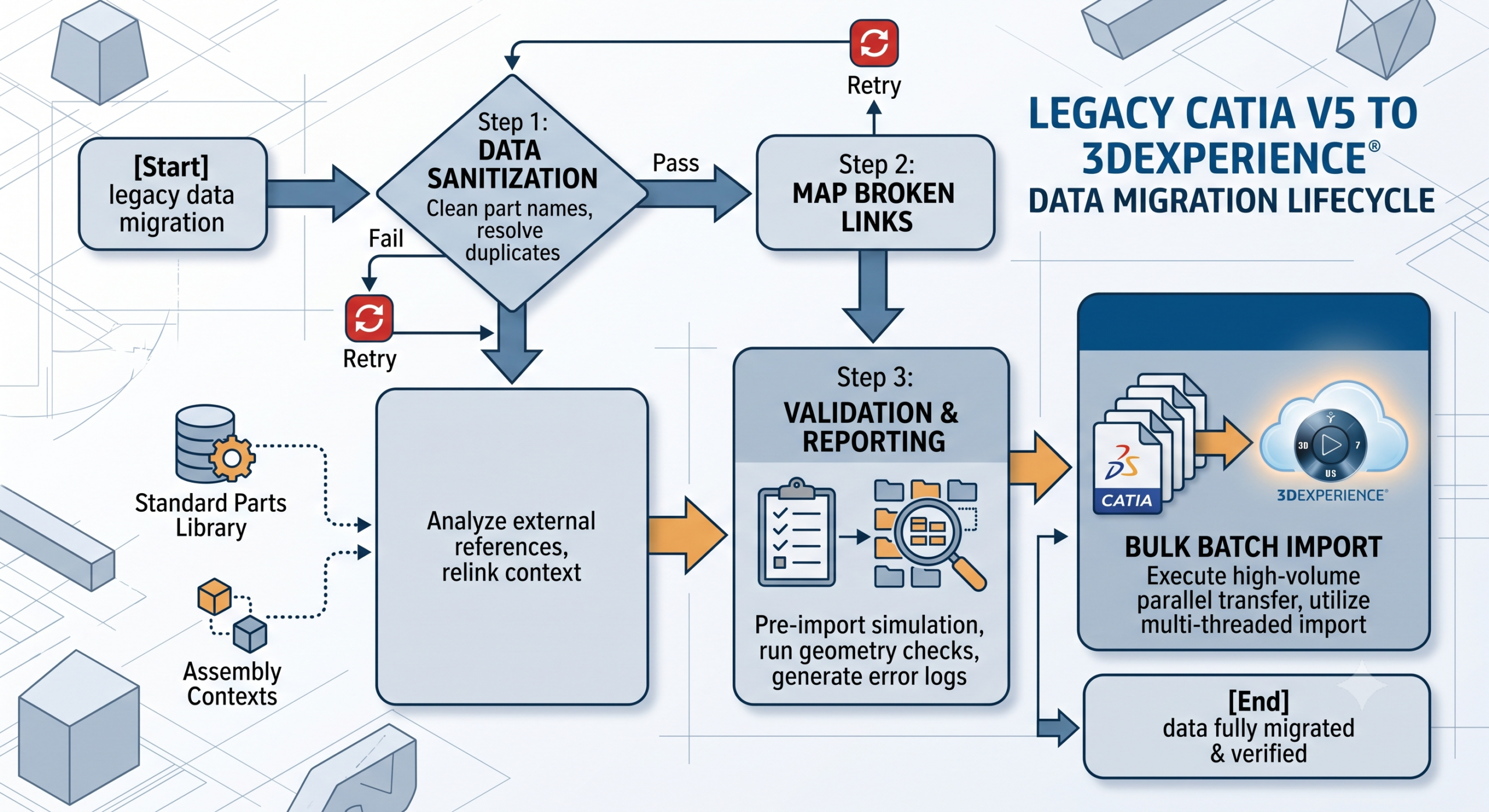
The overall migration lifecycle is visualized in the flowchart below:
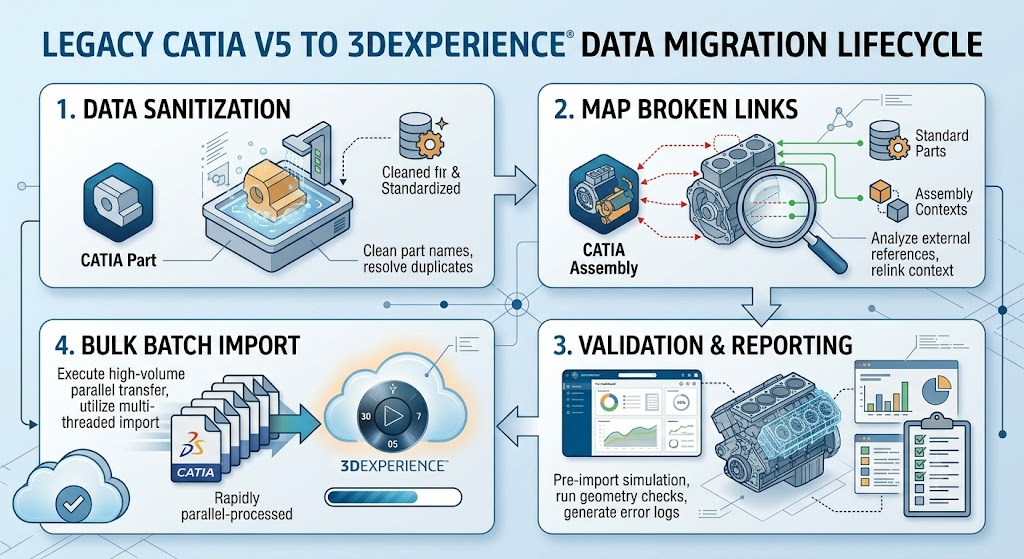
Pillar 1: Data Sanitization
Before attempting any migration, the legacy data must be analyzed and “cleaned.” This step addresses nomenclature chaos, duplicate files, and ensures that the metadata associated with the physical files is accurate and consistent with the target PLM schema.
Pillar 2: Mapping Broken External Links
This is the single most complex challenge in any CATIA V5 migration. V5 assemblies and contextual designs often reference other parts and assemblies located elsewhere on a network drive. Over years, those paths change, leading to “broken” or ambiguous links. The migration process must analyze these links and logically remap them to the new standardized library structures.
Pillar 3: Validation and Reporting
Organizations cannot afford to import data blindly. Pre-import simulations must be executed on a representative sample of the data. This produces geometry checks, error logs, and validation reports that confirm whether the Sanitization and Link Mapping phases were successful.
Pillar 4: Bulk Batch Import
Finally, once data integrity is confirmed, the verified files must be ingested into 3DEXPERIENCE rapidly and efficiently. This uses the dedicated high-throughput mechanisms of XCAD Designers.
2. Deep Dive Phase 1: Step-by-Step Data Sanitization
The goal of data sanitization is to remove технических debt from the legacy repository. The most significant V5 técnico debt is duplicate files and non-standard naming conventions. Importing thousands of “Part1.CATPart” files will destroy the target 3DEXPERIENCE environment.
Sanitization Logic Flow and Duplicate Resolution
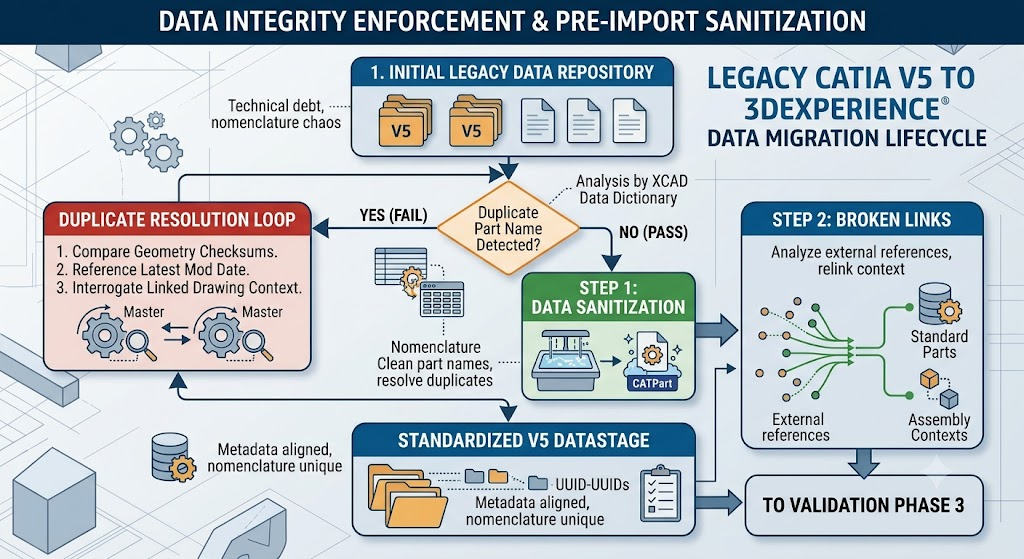
To prevent technical debt pollution, the sanitization process follows a specific logic:
The Duplicate Resolution Loop (Failsafe)
If a duplicate file name is detected, the workflow activates the Duplicate Resolution Loop. XCAD Designers do not simply stop; they interrogate the files:
- Geometry Checksum Comparison: Is the actual 3D geometry identical?
- Latest Modification Date: Which file is the actual ‘Master’ based on recent engineering work?
- Linked Drawing Interrogation: Are drawings associated with one file but not the other?
The loop resolves the duplicates and loops back to the main sanitization decision, where it passes on to “Step 1: Data Sanitization” as a single, verified master.
3. Deep Dive Phase 2: Mapping Broken External Links
CATIA V5 file-based design encourages external references. Assemblies point to part files, and contextual parts often rely on other geometric masters. In a legacy system, these links are frequently broken due to network path changes, file renames, or server migrations. Moving this data blindly into the platform will lead to context corruption and geometrical “ghosts.”
This phase focuses on interpreting the V5 contextual debt and re-establishing clean, database-driven relationships.
Identifying and Resolving Link Ambiguity
The migration process must replace file paths with database pointers.
| Legacy V5 Link Context | Typical Broken Status | Resolved XCAD Platform Pointer |
Assembly points to Part file on Server \\ENG_SRV\LegacyData\Part1.CATPart | Server renamed; Part file moved to \\SRV-NEW\V5_Archive | XCAD generates a unique identifier (UUID) based on geometric checksum during sanitization, replacing the file path. |
| Contextual Part relies on Geometry Master from another Product | The Geometry Master product is missing or its name is ambiguous. | The XCAD migration analyzes the assembly tree and locates theGeometry Master master based on the unique geometric identifier identified in Phase 1. Contextual constraints are remapped to the database pointers. |
| Associative Drawing points to obsolete Part | The Part file name is present, but the physical file is corrupt or empty. | Validation identifies a missing file. A placeholder is generated, or (more robustly) Phase 2 attempts to relink the drawing to the correct geometric master identified in sanitization. |
4. Deep Dive Phase 3: Validation and Reporting (Pre-Import Simulation)
You must never attempt a high-volume import without pre-validation. Organizations cannot treat 3DEXPERIENCE as a data landfill. The platform is data-driven; poor data in leads to a broken PLM implementation.
Validation is the critical gateway, where the output of the Sanitization and Link Mapping phases is simulated against the target database structure.
The Geometry Interrogation and Validation Logic Flow
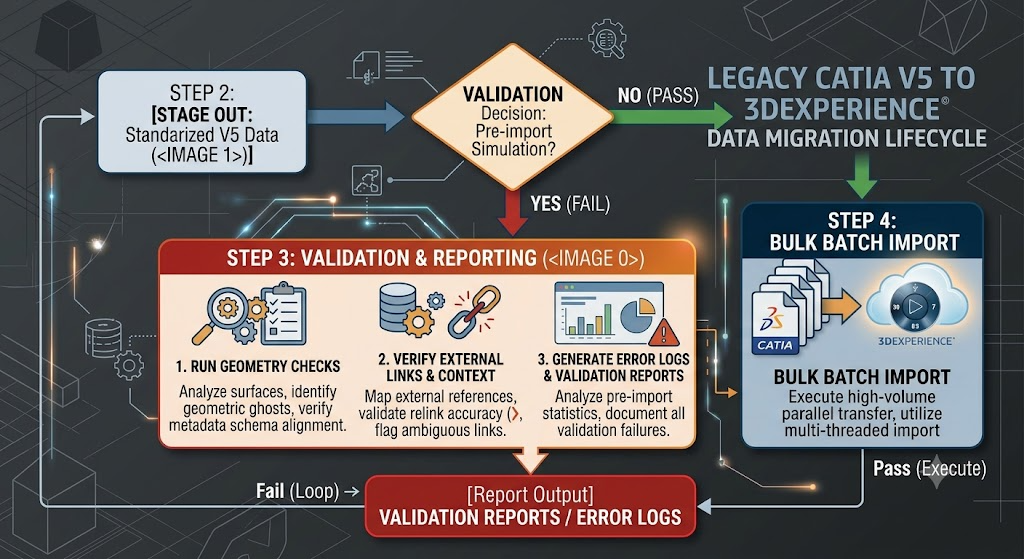
The validation lifecycle is visualized in the flowchart below:
Understanding the Validation Lifecycle
A diamond-shaped decision block asks, “VALIDATION Decision: Pre-import Simulation?”
- NO (PASS): If simulation is skipped (highly discouraged), the workflow points directly to executing “Step 4: Bulk Batch Import.”
- YES (FAIL): The process activates “Step 3: Validation & Reporting,” which is a robust, investigative loop:
- Interrogation Process 1: Run Geometry Checks. Sub-text: Analyze surfaces, identify geometric ghosts, and verify metadata schema alignment.
- Interrogation Process 2: Verify External Links & Context. Sub-text: Map external references, validate relink accuracy (Phase 2 analysis), and flag ambiguous links.
- Interrogation Process 3: Generate Error Logs & Validation Reports. Sub-text: Analyze pre-import statistics, and document all validation failures.
The validation output arrow from Process 3 is a red decision block: VALIDATION REPORTS / ERROR LOGS.
- Fail (Loop) -> leads back to Step 1: Data Sanitization for correction.
- Pass (Execute) -> points down to Step 4: Bulk Batch Import execution.
5. Deep Dive Phase 4: Bulk Batch Import Execution
The validation lifecycle is verified, geometry fidelity is confirmed, and external links are remapped to UUIDs. Organizations must now utilize the specialized mechanics of XCAD Designers to achieve high-volume throughput.
This is not just “saving as 3DEXPERIENCE.” This is parallel, automated processing optimized for bulk data ingestion into the database.
Initializing the Parallel Processing Context
Import engines like XCAD Designers utilize parallel threads and multi-threaded processing to speed ingestion. Engineers do not run this manually inside the CATIA application interface; they initialize a batch processing context.
The most efficient bulk import method utilizes specialized migration scripts to automate the execution across multiple import nodes (servers).
# [MIGRATION_CONTEXT] Parallel Bulk Import Initialization Script
# Context: Initializing XCAD Designers Batch Import nodes for parallel processing

import DS_XCAD_Import_Kernel  # Specialized Migration Kernel
import os

# --- DEFINE PARAMETERS ---
source_repository = r'\\NAS-SRV\Standardized_Data_Stage' # Sanitized Phase 1 Data
target_3dx_credentials = {
    'platform_url': 'https://3dx.enterprise.com/platform',
    'security_context': 'VPLMAdmin.Enterprise.Standard'
}
log_output = r'D:\XCAD_Logs\Import_Session_01'
import_report = r'\\NAS-SRV\Standardized_Data_Stage\import_report.xml'

# --- INITIALIZE KERNEL ---
kernel = DS_XCAD_Import_ Kernel.InitializeBatch(target_3dx_credentials)

# Load the verified XML validation report generated in Phase 3 Validation
# This XML acts as the 'Data Dictionary' defining the import logic.
print(f"Loading validated 'Data Dictionary' report: {import_report}")
import_plan = kernel.LoadMigrationPlan(import_report)

# --- EXECUTE PARALLEL IMPORT ---
print("Initializing Parallel Import Nodes...")
# Utilizing Multi-Threaded processing based on validated checksums
# Utilizing multi-node transfer logic
import_session = kernel.ExecuteParallelBatch(
    migration_plan=import_plan,
    input_repository=source_repository,
    parallel_nodes=8,        # Maximize parallel threads
    checksum_verification=True # Force Phase 3 geometry validation
)

# --- FINALIZE SESSION & LOGS ---
# Monitor and output import session status
kernel.GenerateSessionLogs(import_session, log_output)
kernel.FinalizeMigration(import_session)

print(f"Import Session Complete. Logs finalized to: {log_output}")
High-Volume Transfer Logic
The execution architecture uses multi-threading and parallel transfer to maximize throughput.
The bulk batch import logic flow is visualized in the infographic below:
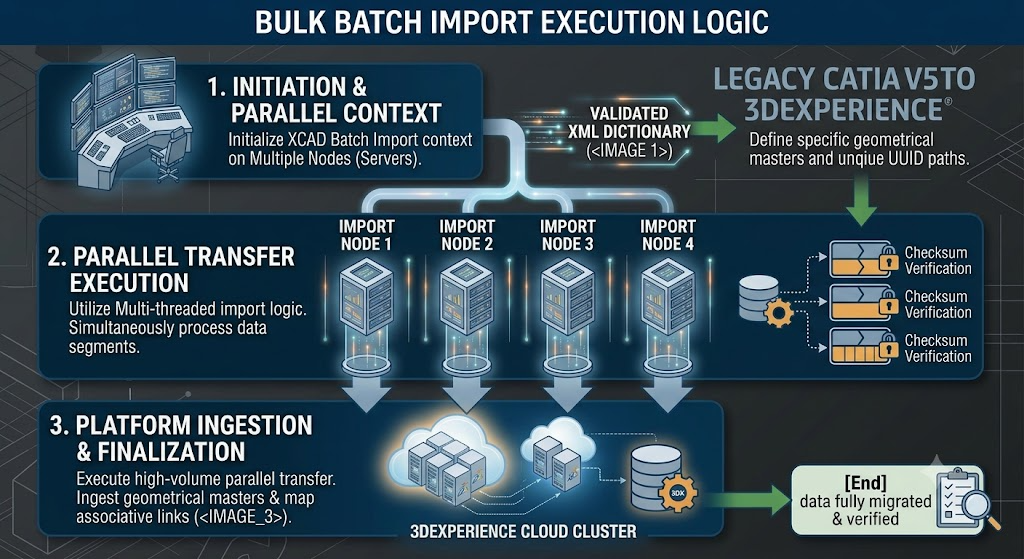
Step 1: Initiation and Parallel Context (Top Zone)
This corresponds to the execution script’s start. A central console initializes multiple import nodes (servers). The key input is the glowing data stream: “VALIDATED XML DICTIONARY (image_19.png).” This XML acts as the roadmap, defining specific geometrical masters and the unique UUID paths identified during the previous sanitization and link mapping phases.
Step 2: Parallel Transfer Execution (Middle Zone)
This zone visualizes the parallel architecture. Four parallel, glowing data pipelines (IMPORT NODE 1 through IMPORT NODE 4) simultaneously process data segments. The Multi-threaded import logic is active. A stylized diagram shows a single data load being broken into segments. Crucially, each segment features a “Checksum Verification” lock icon, confirming that the Phase 3 geometry validation is enforced during ingestion (image_19.png logic).
Step 3: Platform Ingestion and Finalization (Bottom Zone)
The verified data streams converge and flow into the final conceptual rendering: the “3DEXPERIENCE CLOUD CLUSTER.” This cluster shows multiple interconnected cloud servers and database storage marked with the 3DX logo (derived from image_16.png). The sub-text confirms the successful high-volume parallel transfer, ingesting the geometrical masters and finalizing the mapping of the associative database links.
Finally, a green connection points to the [End] state: “data fully migrated & verified,” with a magnifying glass over a checklist, confirming successful completion.
Conclusion
Migrating legacy CATIA V5 data into 3DEXPERIENCE is a complex engineering challenge, not an IT file move. Success requires transitioning from a file-based mindset (network paths and filenames) to a database-driven ecosystem (UUIDs, geometric checksums, and associative pointers).
By following this four-pillar lifecycle—Data Sanitization, Mapping Broken External Links, Pre-Import Validation, and Executing Bulk Batch Imports—organizations ensure they are building their modern digital thread on a clean, verified foundation. Data integrity is the price of admission for modern digital transformation. While the path from legacy technical debt is complex, utilizing the automated, parallel mechanics of XCAD Designers allows organizations to bridge their file-based past to the platform-based future securely and efficiently.